Are you using HttpClient in your .net projects as well as Azure Functions as general .net projects?
That is awesome, however, in this post I am going to talk about the IHttpClientFactory, what benefits you gain from using it, how to use it and why I think it's a good idea to do so.
A word about Dependency Injection
To use IHttpClientFactory in you code, you should be using DI to inject it (and any other class dependencies your code have). DI is a subject in it self and I wont go too much in details about the benefits of it in this post, instead head over to this Microsoft article if you want to learn more about it.
I also wrote an article about DI in Azure Functions which this article is building on:
So why use IHttpClientFactory?
First, when we need to make an HTTP request in our code, we very often need to send some additional data in that request, like for instance sending some specific HEADER values. If we don't use the IHttpClientFactory then we would need to create a new HttpClient everytime we need to do a HTTP request and then we also need to add the HEADER. This can lead to a lot of code duplication, which in my opinion is one of the things that we, as developers, should seek to limit as much as possible, because duplication is the root of all sorts of evil things like unexpected bugs, low maintainability and so on. So to avoid that, please read on!
Coding time!
Now lets get to the fun stuff. Here's what we need to do to have an Azure Function that is able to make HTTP requests using an injected HttpClient:
- Create a HTTP Triggered Azure Function project
- Add additional Nuget packages
- Add Startup.cs
- Modify function .cs files
Creating the project
This one is easy > fire up VS > File > New > Azure Function > Select HTTP Trigger
Adding the Nugets
This one is also covered in my previous article, but here are the relevant packages to install:
Install-Package Microsoft.Extensions.Http -Version 3.1.14
Install-Package Microsoft.Extensions.DependencyInjection -Version 3.1.14
Install-Package Microsoft.Azure.Functions.Extensions -Version 1.1.0
Install-Package Microsoft.NET.Sdk.Functions -Version 3.0.11
If you want to deploy to Azure then stick with the version 3.x of the 2 first packages, as there is not full natively support for .net 5 yet.
Add Startup.cs
Our initial Function project do not contain any Startup.cs and since this is the place where all the magics happens, we need to add that, so at the root of our project, add a new class: Startup.cs.
We will start by just injection the HttpClientdirectly so add this snippet to your Startup.cs:
using Microsoft.Azure.Functions.Extensions.DependencyInjection;
using Microsoft.Extensions.DependencyInjection;

[assembly: FunctionsStartup(typeof(Blog.Jepsen.Ninja.Startup))]

namespace Blog.Jepsen.Ninja
{
    public class Startup : FunctionsStartup
    {
        public override void Configure(IFunctionsHostBuilder builder)
        {
            builder.Services.AddHttpClient();
        }
    }
}
Modify your function file
When using DI, we inject the objects we need into our classes using the constructor. The default function class is marked static and a static class cannot have a constructor. We therefore need to make a few adjustments to the generated function class:
- Remove the
statickeyword from the class definition - Remove the
statickeyword from the method definition - Add a constructor that takes the
HttpClientas a parameter - Add a
readonlyfield to the function class to hold theHttpClient
Now your function class should look something like this:
public class HttpTriggerFunction
{
    private readonly HttpClient httpClient;
    public HttpTriggerFunction(HttpClient httpClient)
    {
        this.httpClient = httpClient;
    }
    [FunctionName("HttpTriggerFunction_InjectedClient")]
    public async Task<IActionResult> HttpTriggerFunction_InjectedClient(
        [HttpTrigger(AuthorizationLevel.Anonymous, "get", Route = null)] HttpRequest req,
        ILogger log)
    {
        var url = "https://blog.jepsen.ninja";
        var sw = Stopwatch.StartNew();
        var response = await httpClient.GetAsync(url);
        return new OkObjectResult($"{url} returned {response.StatusCode} in {sw.ElapsedMilliseconds}ms.");
    }
}
That's it - now you are ready to test your function out, run it, browse to the url listed in the console, usually it's something like:
http://localhost:7071/api/HttpTriggerFunction
And the response should look like this:
https://blog.jepsen.ninja returned OK in 228ms.
Using different HttpClient instances
Now to truly benefit from the IHttpClientFactory injection we are going to make a few modifications. In this example we are going to add a custom User-Agent based on the function. This is just for demonstration purposes, in real life, we could have different HttpClient instances for authenticated and none authenticated request. We could have different instances for different external services we were depending on, and so forth.
If we were to just use a single HttpClient per class, we can just add the following to our Startup.cs
services.AddHttpClient<ISomeService, SomeService>();
However, we want to have different HttpClient instances in the same function class, so we need to inject the IHttpClientFactory.
Modify Startup.cs:
public override void Configure(IFunctionsHostBuilder builder)
{
    builder.Services.AddHttpClient();
    builder.Services.AddHttpClient("blog", c =>
        {
            c.BaseAddress = new Uri("https://blog.jepsen.ninja");
            c.DefaultRequestHeaders.Add("User-Agent", "Blog.Jepsen.Ninja.Functions");
        });
}
Then in your functions class do the following:
- Modify the construtor to also take a
IHttpClientFactory - In the constructor, get the
HttpClientinstance by callingCreateClientand pass the name - Assignt the client to a class field
- Add another function method to use the new
HttpClient
Doing so, your function file should look like this:
 public class HttpTriggerFunction
 {
     private readonly HttpClient httpClient;
     private readonly HttpClient blogClient;
     public HttpTriggerFunction(IHttpClientFactory httpClientFactory, HttpClient httpClient)
     {
         this.httpClient = httpClient;
         blogClient = httpClientFactory.CreateClient("blog");
     }

     [FunctionName("HttpTriggerFunction_InjectedClient")]
     public async Task<IActionResult> HttpTriggerFunction_InjectedClient(
         [HttpTrigger(AuthorizationLevel.Anonymous, "get", Route = null)] HttpRequest req,
         ILogger log)
     {
         var url = "https://blog.jepsen.ninja";
         var sw = Stopwatch.StartNew();
         var response = await httpClient.GetAsync(url);
         return new OkObjectResult($"{url} returned {response.StatusCode} in {sw.ElapsedMilliseconds}ms.");
     }

     [FunctionName("HttpTriggerFunction_NamedHttpClient")]
     public async Task<IActionResult> HttpTriggerFunction_NamedHttpClient(
 [HttpTrigger(AuthorizationLevel.Anonymous, "get", Route = null)] HttpRequest req,
 ILogger log)
     {
         var sw = Stopwatch.StartNew();
         var response = await blogClient.GetAsync(string.Empty);
         return new OkObjectResult($"{blogClient.BaseAddress} returned {response.StatusCode} in {sw.ElapsedMilliseconds}ms.");
     }
 }
Now run the project, and you will see 2 endpoints showing:
HttpTriggerFunction_InjectedClient: [GET] http://localhost:7071/api/HttpTriggerFunction_InjectedClient

HttpTriggerFunction_NamedHttpClient: [GET] http://localhost:7071/api/HttpTriggerFunction_NamedHttpClient
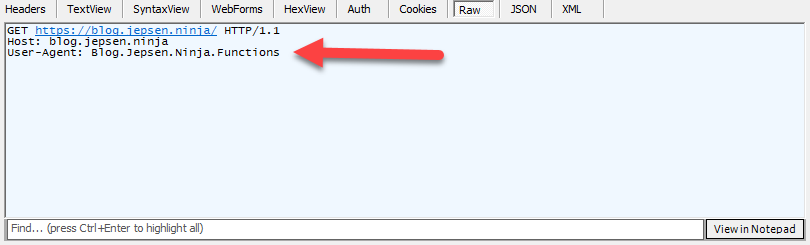
We can then inspect the HttpRequest using Fiddler and verify that our User-Agent is set correctly in the second method:
Wrapping up
That is it for today´s HttpClient/HttpClientFactory tutorial. As you can see, there are many benefits from using DI together with HttpClient. This articled focused on how to use it in an Aure Function, but you can of course use this approach in any .NET project running the latest .net version.
The source code and project files for this article is available on Github, please feel free to check it out!
In general I try to add all the resources related to my blogging in the following Github repo. Feel free to browse:
About the author
Copenhagen based cloud developer. Love to code and to make complex solutions simple!
Comments
Join the discussionNo comments yet. Be the first to comment.
Azure Functions
This series will cover lots of practical and hard learned experiences developing Azure Functions. Read about how to design your microservice setup, how to implement the functions using triggers.